Anyone have success installing MC Education on a managed Chromebook

We have several different brands/models of CB's and all fail installation indicating storage issues. The CB's have ~1.3GB free and the installation is asking for 374mb. We erase user profiles on user log off and tried power washing the devices.
-

Is your chromebook managed by your school? My Chromebook was and I could install it. Im not an expert but maybe your school or whatever else is managing your Chromebook doesn't allow mc edu.
0 -

Hey there Glenn!
Sorry for the delay. It looks like you have a ticket open with us and got your issue resolved though!
Thanks for the tips as well Emmanuel!
0 -

Hello everyone,
We are experiencing the exact same issue with our Chromebooks. Can you please share the solution?
Thanks!
0 -
Hey there Nick!
Sorry to hear you are running into some issues as mentioned above. Could you share a screenshot (without any personal info) of how much space is available on the device and how much of that space is being used currently? Also can you share any screenshots of the error messages you get?
Have you had issues prior? How many users are running into this?
Thanks!
0 -

I would also like to know what the solution was that fixed the issue for Glenn. Been through the whole ticket process and our only solution at this point is telling the teachers that they can't use Minecraft education.
0 -
Hey there Todd!
Sorry to hear you are running into some issues still. I reviewed your ticket and it looks like it was recommended to reach out to PlayStore Support. You could try clearing the PlayStore cache as well as a test step as well. Were you ever able to reach out to PlayStore Support? How did that experience go?
That being said, it would be interesting as well to hear what did end up working for Glenn!
0 -
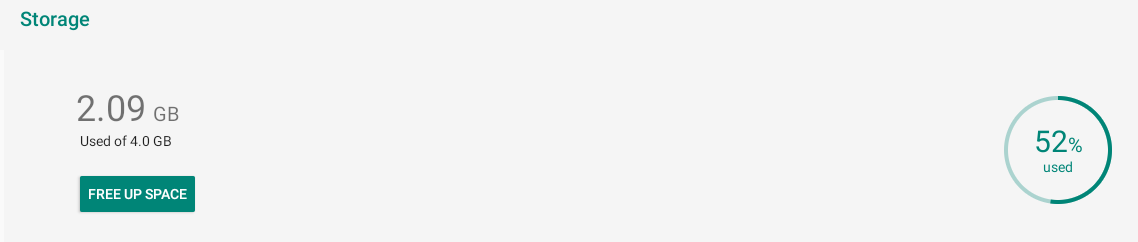
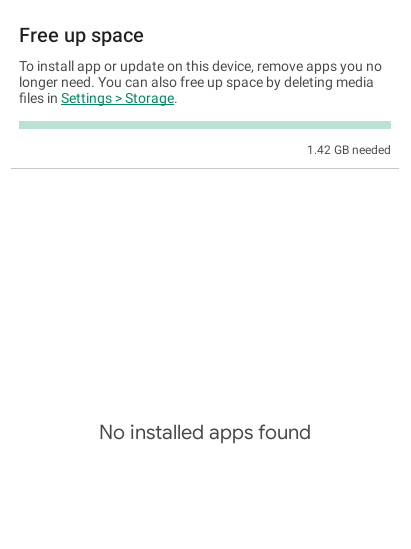
Hey Danny, thanks for your response! We don't have any other 3rd party apps installed and there is just about 2GB of space, so it seems like that should be enough? We've tried installing it on both of the different Chromebook models we have and across a few different devices, but they all end up saying there's not enough space.
Storage space:
Installation error:
 0
0 -
Hey there!
Thanks for the screenshots and the info! It looks like in the first screenshot, that doesn't quite make our minimum specs for empty space, it looks like it isn't quite 2GB free and you would need to have that. The more the better. I would be surprised if you had 3GB free and still had that error, but do let us know if you notice that!
https://edusupport.minecraft.net/hc/en-us/articles/360047556591-System-Requirements
0 -

We find that our Chromebooks are continually running out of storage space, despite assigning certain Chromebooks to students (we were advised to do this so as to avoid multiple worlds being created on the same device). Is there a way to minimise the amount of storage that Minecraft Education takes up?
0 -
That's a bummer, we don't have anything else installed on them, so I guess they just don't have enough space to begin with. I appreciate your responses, thanks Danny!
0 -

Hey Kathleen Macaulay,
Because of how ChromeOS works, each user who installs the app has a full separate install, which can eat up space pretty quick. If you're using these devices in a shared experience (multiple students using 1 device) this could cause issues. We recommend not sharing ChromeOS Devices.
Let us know if you have any additional questions, or concerns!
Thank you!0
Please sign in to leave a comment.
Comments
11 comments