World Update

Hello,
For some reason, I can't seem to update my 2-year-old world. The app itself has been updated to v26.3, but the world seems to be stuck around 1.21. Is there a way to fix this, or is the file itself corrupted?
The only known method I've tried is downloading the world and then reuploading it on my account, and nothing has seemed to have changed.
If any information can be provided, this would be really helpful. I'd like to see the new blocks in my world.
-

Hey there!
The way new blocks work in your world, is that they will only appear in areas that have not been previously explored. So if your app is updated to v26.3 and you explored a lot in your new world, to see all the new content you will need to go many many many blocks from your already explored areas to allow new areas to be rendered in. I hope that helps!
1 -
Thanks for replying!
Does this also apply to education's equivalent for super flat worlds? Cause that the set biome for this world Ill try and fly further from spawn and restart my app for now.
0 -

Hey Angelina,
Yes! The same applies for all custom worlds. There are some limitations with library content, however as they sometimes need to be updated by creators to get the new features.
However, for custom worlds (flat or not!) all you need to do is fly out into areas that have not been previously generated in older versions. You could also randomly teleport to a new area as well with the command: /execute at @p run spreadplayers ~ ~ 50 1000 @aThe above command will randomly teleport you by about 1000 blocks, which should be outside most render distances.
If you're looking for new items in your inventory, they should already be there. Please let me know if you're seeing different.0 -
Hello, sorry for replying so late. Unfortunately, nothing changed after using the command a couple of times. I've also tried flying manually over 1000 blocks to render new chunks, and nothing has seemed to change. I've also tried closing the app and retrying, but nothing worked either. Are there any other methods you could suggest to help update my world? Also, if something were to change, what should I look for?
0 -
Hey Angelina,
On a super flat worlds, the world is hardcoded to only generate a layer of grass blocks and bedrock with a limited set of structures that can generate. On these worlds you may not find the latest structures generating.
0 -
Hello,
Sorry, I meant this for my inventory; I did not fully intend to load any new structures. It seems that my world itself is unable to update to the newest version for blocks, items, and mobs. The most recent option I've tried is downloading my world, then importing it, and nothing has changed. Are there any advice or solutions, perhaps?
0 -
Hey there,
What items, blocks and mobs are you missing from your world?
Also, if we were to make a ticket for you would you be willing to share your world so we can take a look on our end?
0 -
Hi!
Pretty much anything from the newest update is missing; I'm estimating my world itself is stuck around the 1.21 update. If I were to be more specific, I don't think I have anything accessible from the Tricky Trials update with the breeze, nor are any of the mob egg and dye textures updated. I wouldn't mind opening a ticket to share my world; please just send me some instructions on what to do.
0 -
Hey there,
Sorry to hear you are running into some issues with not seeing some of the latest content. What version of Minecraft Education are you on? Could you screenshot the version number at the bottom of the screen?
Has this world been around for awhile? You would need to travel out many blocks to unexplored territory for the new stuff to load in like trial chambers if you had this world for awhile.
If it has been world and the version number looks good, I can open a ticket for us for you to share your world and we can keep troubleshooting from there.
0 -
Hi!
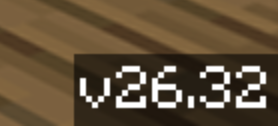
The application for Minecraft Education itself is up to date (v26.32; screenshot is also below); it's my world that isn't updating. My world was made around early 2024. Since it's a single-biome superflat, there are no structural spawns for the world itself(villagers, strongholds, etc...); I have travelled a couple thousand blocks to load more chunks as well as instructed before, and I myself have tried the locate command to find structures, and it appears to have errors that no structure is found at a reasonable distance.
Some other odd things that I can't do on this specific world are host, or for some reason I can't light Nether portals; not sure why that happens, but if I were to create a new world, everything is working and up to date with the Chaos Cubed update.
Seed of the world: -455094230610363158
Opening a ticket would be helpful unless there's a way to check the version number of the world,because I'm only estimating what version my world is stuck in.

 0
0 -
Hey Angelina Wing Yan Ng,
I'd like to apologize as I misinformed you a little bit above.
In Minecraft Bedrock and Minecraft Education structures do not generate in worlds created the with "Flat World" toggle enabled. This includes villages, strongholds, etc. There are advanced ways to generate flat worlds with structures by editing the worlds `level.dat` file, with behavior packs, or with external tools, but this isn't something we formally support here.As for hosting not working, nether portal not lighting, and items missing - this is unexpected. Just to verify when you created this flat world, did you make it with the Flat World toggle in Advanced Settings or was this created via one of the Library Templates?
It's possible your world has an education.json file limiting the items that are available. I'd love to look into this world file a bit closer and see what may be occurring. I'll create a ticket for us and respond there to see if you can send us over a copy!
Let us know if you have any additional questions, or concerns.
Thank you!0
Please sign in to leave a comment.
Comments
11 comments