P0 CRITICAL: Latest Minecraft Education Release Is Unusable on Windows — EXE Installation Failure and Severe Multiplayer Crashes

Please ask the official team to immediately investigate the installation and product compatibility issues in the latest version. We are currently experiencing serious bugs and multiplayer connectivity problems.
-
The EXE installer cannot be accessed or loaded properly, preventing users from completing the installation.
-
Minecraft Education frequently crashes on Windows devices when attempting to join a world, making multiplayer sessions extremely unstable.
These issues are seriously affecting teaching activities and normal user access, especially in classroom and multiplayer scenarios.
Please treat this as a high-priority issue and investigate the latest release as soon as possible, including the Windows installer, client stability, and multiplayer compatibility.
-
We are receiving a large number of complaints and issue reports from students every day regarding these problems.
I strongly recommend introducing a clear countdown or advance notice period before releasing major updates, so schools, teachers, service providers, and users have sufficient time to prepare.
More importantly, I believe new versions should undergo thorough compatibility testing, installation testing, multiplayer testing, and real-world classroom scenario testing before being rolled out globally.
Once the product has been fully tested and confirmed to be stable across supported devices and environments, the update can then be synchronized and released to users worldwide.
For an educational product that is widely used in classrooms, release stability is extremely important. Critical installation failures, crashes, or multiplayer issues can directly disrupt scheduled teaching activities and affect a large number of students and teachers.
0 -
We have now identified what appears to be the root cause of the Windows crash issue.
The Microsoft Store-distributed version of Minecraft Education uses a newer version of CEF (Chromium Embedded Framework / Chromium), while the Minecraft Education version distributed through the standalone EXE installer appears to still include a significantly older CEF/Chromium build.
The underlying crash issue has already been fixed in newer Chromium/CEF versions, and the Microsoft Store-distributed APPX/MSIX version of Minecraft Education appears to have incorporated that update.
However, for reasons we do not yet understand, the standalone EXE installer does not appear to have received the same CEF/Chromium update. Based on our investigation, this component may have remained outdated for a very long time — potentially for more than three years.
Why the crash happens
When a user enters a Minecraft Education world, MakeCode is automatically initialized in the background.
MakeCode relies on an embedded Chromium-based web environment. When the world loads, this embedded Chromium/CEF component is started automatically in the background.
The older Chromium/CEF version included with the EXE-distributed Minecraft Education client appears to trigger the crash.
As a result, the behavior is very consistent:
The user enters a world → MakeCode/embedded Chromium initializes in the background → the outdated Chromium/CEF component encounters the issue → Minecraft Education crashes.
This explains why the application may launch normally but then crash immediately or shortly after entering a world.
The important point is that this Chromium-related problem has already been fixed upstream, and the Microsoft Store version of Minecraft Education appears to already include the corrected version.
The standalone EXE installer, however, does not appear to have been updated accordingly.
Current workaround and operational impact
At the moment, we can ask students to install Minecraft Education through the Microsoft Store to avoid this issue.
However, this is not a practical long-term solution.
A significant number of Windows devices in real classroom environments have Microsoft Store problems, including Store services not functioning correctly, download failures, account-related issues, update failures, or Store components being disabled or damaged.
Whenever this happens, our technical staff must manually troubleshoot and repair the Microsoft Store environment before Minecraft Education can be installed.
Each affected device typically requires approximately one to one and a half hours of technician time.
With a large number of student devices, this creates an extremely significant support burden and labor cost for us.
For schools and organizations deploying Minecraft Education at scale, the standalone EXE installer is therefore extremely important.
We strongly recommend that the Minecraft Education engineering team compare the CEF/Chromium versions bundled with the Microsoft Store package and the standalone EXE package, and update the EXE installer so that both distribution channels use the same current, fixed Chromium/CEF implementation.
At this point, this is not only a minor compatibility issue. It is directly causing application crashes when students enter worlds and is seriously affecting classroom deployment, multiplayer activities, technical support workload, and normal teaching operations.
0 -
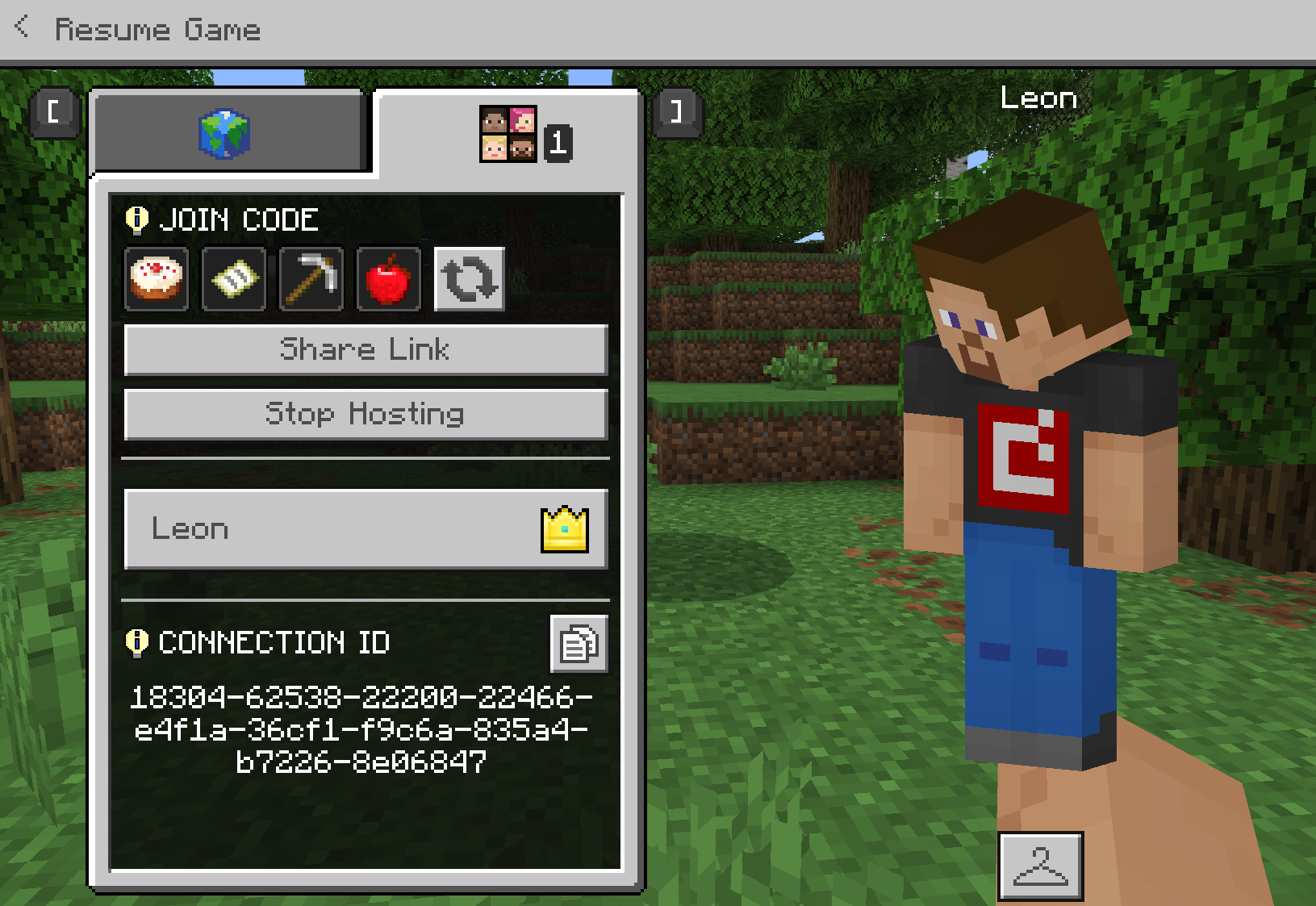
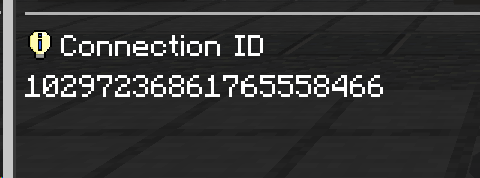
The four-icon Join Code is certainly a useful feature, but the numeric Connection ID has always been an equally valuable backup option. In real-world use, it has helped us solve connection problems many times.
When a student is unable to join using the icon-based code, I can simply read the Connection ID aloud and have them enter it digit by digit. I can also copy the number and send it to them, or take a screenshot and share it with students or their parents.
This is especially important for younger students.
Many young students have not yet learned basic computer operations such as copying and pasting. The easiest method for them is often to look at the numbers on the screen and type them one by one, or to listen while the teacher reads the numbers aloud.
So even though the previous Connection ID system was not perfect, it was at least a human-readable backup connection method that students could understand and enter manually.
After this update, however, I find it very difficult to understand the reasoning behind the new Connection ID format.
The new Connection ID has become so long and complex that it is practically impossible for students to enter it by looking at the screen or listening to a teacher read it aloud. In practice, it has become something that can only reasonably be used through copy and paste.
This removes one of the most important purposes of the Connection ID.
I genuinely do not know whether this means students have now permanently lost the ability to manually enter a Connection ID to join a world.
This is extremely disappointing.
Even during the period when Minecraft Education temporarily removed the option to enter a Connection ID, we did not feel as frustrated as we do now. At that time, even if there was temporarily no place to enter it, we could still see a clear, simple, human-readable Connection ID. We knew it remained a useful connection method and that only the input option had been temporarily unavailable.
Now, the Connection ID still technically exists, but it has become a string that is almost impossible for young students to read, communicate verbally, or enter manually.
From the perspective of real classroom use and student technical support, this does not feel like an improvement. Instead, it has taken away much of the practical value of what used to be a very useful backup connection method.
I sincerely hope the team will reconsider this design.
Even if the four-icon Join Code remains the primary connection method, please preserve a short, readable, speakable, and manually enterable numeric Connection ID as a backup option for situations where students are unable to join using the icon-based code.
For teachers and technical support staff who help large numbers of students join Minecraft Education worlds every day, this may seem like a small feature, but in practice, it is extremely important.
 0
0 -
Regarding the recent Minecraft Education updates, my concern is no longer limited to one specific feature. I am beginning to worry that the product is gradually moving away from the original principles that made Minecraft Education so valuable.
A large part of Minecraft Education’s user base consists of children, teachers, and schools. Because of this, it should place even greater emphasis than the standard version of Minecraft on simplicity, clarity, stability, and ease of use.
However, some of the recent changes seem to be moving in the opposite direction. Features that were once simple and intuitive are becoming more complicated and less suitable for children, while at the same time, the number of issues and bugs seems to be increasing.
This makes me genuinely wonder what is happening with Minecraft Education.
I do not know whether there have been changes within the development team, whether maintaining Education Edition has become significantly more difficult as Minecraft itself continues to evolve, or whether there are other technical or product-related challenges that ordinary users simply cannot see.
Whatever the reason may be, the end result presented to users should still be a product that feels carefully designed, carefully maintained, and properly finished.
For a product designed primarily for children and educational environments, it is not enough for a feature to simply “work.”
It also needs to consider whether a child can understand it, whether a teacher can use it easily, and whether schools can rely on it in larger-scale deployments without constantly encountering unnecessary technical problems.
I sincerely hope that Minecraft Education community managers will take these concerns seriously and pass them on to the development team. I also hope the developers will pay closer attention to the growing feedback from the community regarding stability, bugs, increasing complexity, and child-friendly usability.
We are not raising these concerns because we do not want Minecraft Education to change.
Quite the opposite — we want to see it continue to improve and succeed.
I simply hope that, while adding new features and introducing new technical changes, Minecraft Education does not gradually lose what made it special in the first place:
allowing children to use Minecraft in a simple, natural, and reliable way to create, explore, and learn.
0 -

Hey there!
Thanks so much for all this info, there is a lot to unpack here. I will make a ticket for us and we can chat there!
0
Please sign in to leave a comment.
Comments
5 comments