The Connection ID formatting appears to be incorrect

While I was testing the latest beta version v26.30.1, I noticed that the Connection ID appeared to be displayed incorrectly. Instead of showing as the one complete ID it usually does, it seems to be split apart and contains more numbers and symbols than it usually has. This makes the Connection ID appear different from what I would normally expect and may be caused by a bug.
The things I noticed with this issue:
The issue occurred after opening a world in the Beta version and hosting it, the Connection ID displayed many more numbers than it normally does in the stanard Minecraft Education version. The Connection ID should appear as one clear line of numbers that can be easily copied, shared, and used for connecting or troubleshooting. But instead, the Connection ID was split up and included an unusual number of additional numbers, making it harder to be able to share the connection id with others, especially when the join code doesn't function properly.
Lastly:
While testing the beta, I also noticed that some of the graphics- settings appear incomplete or broken. The setting “Allow In-game Graphics Mode Switching” is available and can be enabled through the Minecraft Education launchers homepage, but in-world graphics switching options do not appear to become available. The Graphics Mode section still does not show advanced options such as Vibrant Visuals which would a good addition to Minecraft Education, allowing anyone with compatible devices to experience improved lighting, shadows, atmosphere, and more realistic visual effects.
Thank you for your work on improving Minecraft Education and I appreciate the opportunity to be able to test the latest beta features and report the issues that I may find to help improve the future versions.
-

Hey there!
Thanks for the report and attention to detail! The Connection ID change is by design, so no worries there. I will share the "making it harder to share with others because of more numbers" feedback with the team.
Sorry you are experiencing issues with some Graphics Settings. I will check with the team on that one for you.
1 -
Hi Danny,
Thank you for taking the time to read through my report and for clarifying that the Connection ID change is intentional. I appreciate you passing along the feedback about the longer Connection ID being more difficult to share.
I also appreciate you for checking with the team regarding the graphics settings and I'm looking forward to hearing if there are any updates.
Thanks again for your help and for supporting the Minecraft Education Beta!
0 -

Hey Joel C,
Our team wasn't able to reproduce this issue in the latest Preview. Enabling the "Allow In-Game Graphics Switching" option in the main menu's settings still allows switching between Simple and Fancy graphics for us. Would you be able to provide us a screenshot of both settings from your end? Additionally, can you also provide your devices specification (CPU, RAM, and GPU mainly).
Lastly, Vibrant Visuals is something the team is working on, but we have no ETA to provide right now. We want to ensure that once it does come out there's a quality experience in our Education specific features, and performance is acceptable on lower end devices. I promise we're working on it, and it's a common request. We appreciate your patience while we work on this in the background.
Because Vibrant Visuals isn't supported or implemented, you won't see some of the options from Bedrock that are associated with it. This includes light bloom, upscaling, volumetric lighting, reflections, etc.0 -


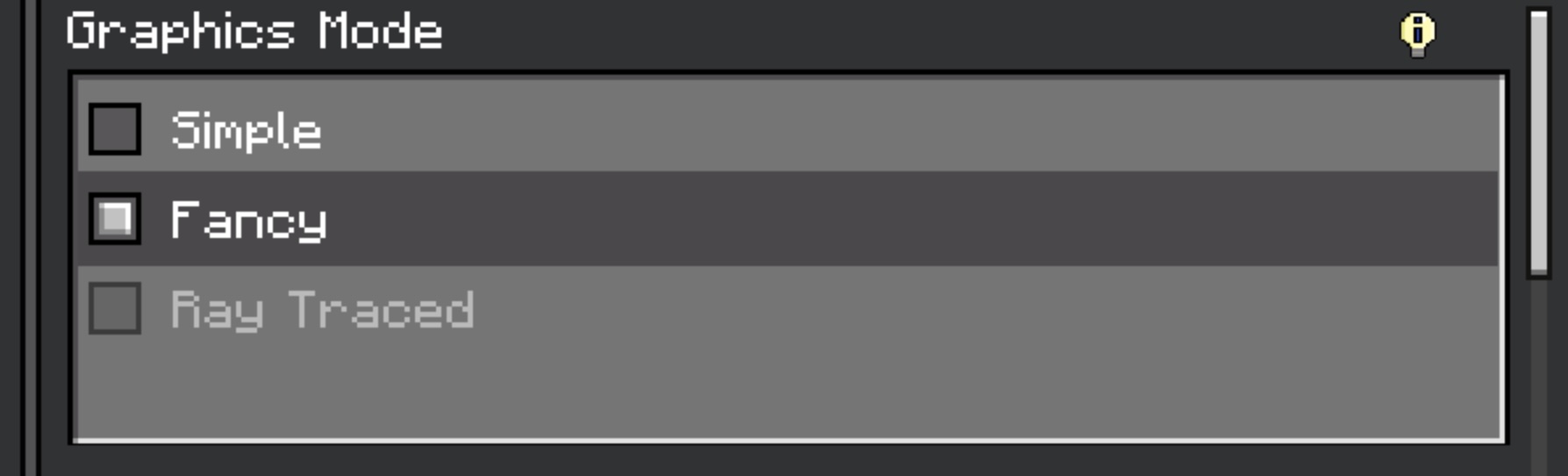
Hi Kaleb,
Sorry for the delayed response as I was having some trouble trying to upload the screenshots due to the file size limit on the support page. I was able to get them compressed and have attached them below.
I just want to clarify the graphics issue shown in these screenshots I uploaded. The normal Graphics Mode is working as expected, and I am able to switch between Simple and Fancy graphics without any problems. However, the issue I am experiencing is specifically with the "Allow In-Game Graphics Switching" feature. Although this option can be enabled from the Minecraft Education launcher, once I enter a world the in-game graphics switching option remains unavailable (greyed out) and cannot be used. In Bedrock Edition, enabling this setting displays a small in-game menu that allows the players to switch between the available graphics modes without having to leave the world. On my device in Minecraft Education Beta, that in-game graphics switching menu never appears, even after enabling the option in the launcher. The standard Graphics Mode setting does work normally, but the separate "Allow In-Game Graphics Switching" feature does not have any effect.
As you had requested, I've attached screenshots of:
- The "Allow In-Game Graphics Switching" setting from one of the Minecraft Education World Build Plates.
- The Graphics Mode settings from within the game.
- And my device specs
Device specifications:
- CPU: Apple M2
- GPU: Apple M2 integrated GPU (Metal)
- RAM: 16 GB
- Operating System: macOS 26.6
- Minecraft Education Beta Version: v26.30.1
- Graphics Renderer: Metal
Also, I was wondering whether there are any specific device requirements or supported hardware configurations for the "Allow In-Game Graphics Switching" feature to work correctly. Since the feature appears to be working on your test devices but not on my device, I was wondering if this could be related to certain graphics hardware, operating systems, or device compatibility. Are there any known device limitations or requirements for this feature that I should be aware of?
Thank you very much for taking the time to investigate this and for the detailed explanation. I really appreciate you for confirming the current status of Vibrant Visuals and the team's plans for it as a lot of people has requested this feature. It's great to hear that it's something that the team is actively working on, and I'm wanting to ensure that it provides a better experience for the Education users across different devices.0 -
Hey there!
Thanks for this info, unfortunately only one screenshot made it through. If we make a ticket for you, I believe uploading screenshots there should be easier and we can continue troubleshooting there. Does that sound good?
0
Please sign in to leave a comment.
Comments
5 comments