Disabling Minecraft Education Weekly Updater

Hi,
I have a question about disabling automatic updates for Minecraft Education on Windows.
The support article says that, for the Windows desktop app, we should disable “Minecraft Education Automatic Updater” in Task Scheduler to prevent automatic updates.
On some PCs, though, I also see another task called “Minecraft Education Weekly Updater.”
Do I need to disable “Minecraft Education Weekly Updater” as well, or is disabling “Minecraft Education Automatic Updater” enough?
I’m trying to make sure the instructions in our training materials are accurate.
Thanks!
-

Hey there!
Could you send a screenshot of the page you are referring to? Then I will check with the team on this. Thank you!
0 -
Hi Danny,
Thanks for checking.
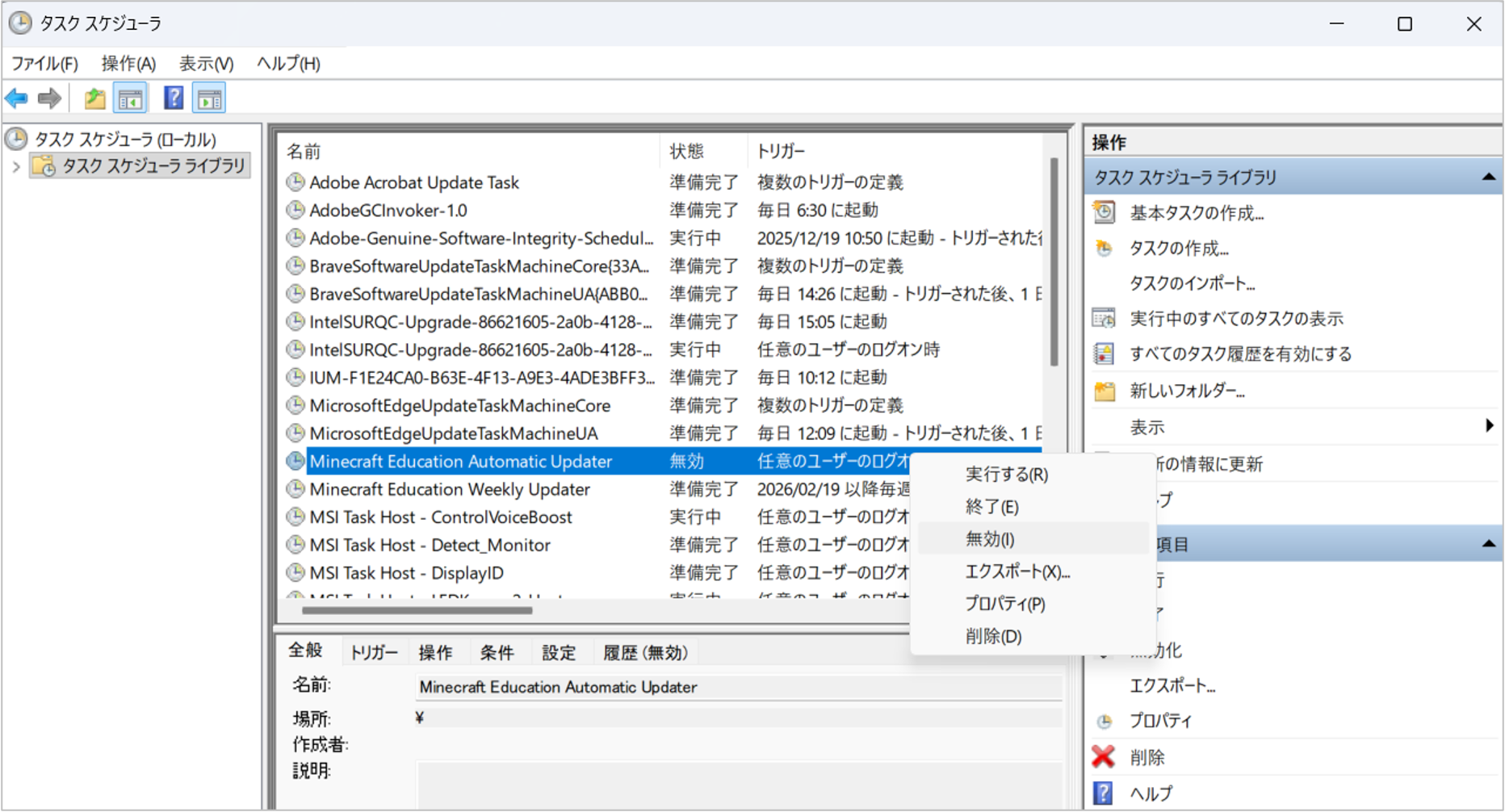
I’ve attached a screenshot showing the two Updater tasks that appear in Task Scheduler.
The support article says that, to prevent automatic updates for the Windows desktop app, we should disable “Minecraft Education Automatic Updater.”
However, as shown in the attached screenshot, on some PCs we see the following two tasks in Task Scheduler:
-
Minecraft Education Automatic Updater
-
Minecraft Education Weekly Updater
In this case, we would like to confirm whether disabling only “Minecraft Education Automatic Updater” is enough to prevent automatic updates, or whether “Minecraft Education Weekly Updater” should also be disabled.
In our testing, we used the following settings:
-
Minecraft Education Automatic Updater: disabled
-
Minecraft Education Weekly Updater: left enabled
After the Weekly Updater trigger time had passed, Minecraft Education was updated to 1.21.133 when we launched it.
We also checked Task Scheduler again afterward and found that:
-
Minecraft Education Automatic Updater had been re-enabled
-
Minecraft Education Weekly Updater was still enabled
We would like to completely prevent automatic updates so that we can manage the Minecraft Education version being used.
Could you let us know whether Minecraft Education Weekly Updater also needs to be disabled, and whether there are any other tasks, services, settings, or actions that should be disabled or changed in order to reliably stop automatic updates?
We would also like to ask about a task called “Updater Task UserS.” We did not see this task in our test environment, but could it appear depending on the deployment or management method, such as MDM or other device management tools? If it appears, should it also be disabled?
We want to make sure our training materials include the correct procedure, so we would appreciate your guidance on the recommended standard approach.
Thanks!
0 -
-
screenshot
 0
0
Please sign in to leave a comment.
Comments
3 comments