Minecraft Education freezes at the launch

Hi,
-
Official comment

Hey all!
Our team is aware of an issue with the latest AMD Drivers affecting some integrated AMD Graphics card (CPUs listed "with integrated graphics). We're looking into this on our end and hope to have a fix as soon as possible. In the meantime, we recommend rolling back to a previous AMD Drivers.
The issue may present in a few ways: the game crashing with a message from AMD Adrenaline, the game freezing in certain areas, crashes when loading into worlds, or other similar symptoms.
Discrete cards seem to be unaffected, but we'd love to hear from you if you're seeing otherwise!
We'll update as soon as we know more! -
Hey there,
Can you help confirm if this is occurring on the Microsoft Store or EXE install of the game?
Additionally, can you verify about how many devices are affected?
Also, can you verify that all your drivers for these devices are up to date? For AMD Drivers, you should be able to grab updated Chipset and Graphics drivers from https://www.amd.com/en/support/download/drivers.html0 -
It was installed via Intune from MS Store. All 17 desktops are affected. I can check the drivers next Tuesday as the Easter break just started at our region. Thanks for the link!
0 -
Hi, I have installed the newest driver but nothing has changed. The game freezes at the start.
0 -
I really need to solve this issue. Does anybody have any clue what to do to make the game working?
0 -

Hey Bohumir! Sorry your messages were missed somehow.
Thanks for updating the drivers, unfortunate to hear it didn't help the issue. We could try the other version of Minecraft Education that is not from the Microsoft Store that you can download from here - https://aka.ms/downloadmee-desktopApp
You would need to first backup your worlds, uninstall and reinstall from the above link. Let us know how things go with that!
0 -
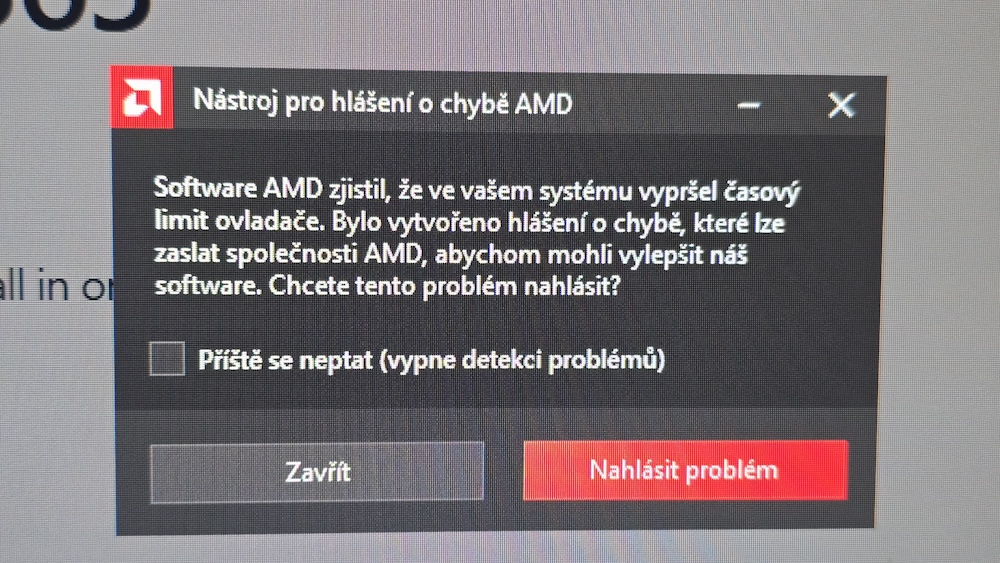
Hi, thank you for another option. Unfortunately, it is all the same. The game freezes. I have installed AMD software: Adrenalin edition (according to your advice and link above). It shows that everything is up to date. But when I start the game after freezing there is this message:
Software AMD has found out that the time limit of your driver has run out.0 -
Here is the message (in Czech)
 0
0 -
When I uninstall the AMD driver the game starts working. BUT - when I reboot the computer immediately the AMD driver is back. It somehow automatically installed itself. And then the game freezes again.
0 -
Hey there,
Thanks for all this info and the screenshot. Was this driver the latest one for your device? You will want to uninstall the old one, and also install a new one. The device needs a driver to function, so it will autoinstall something to function, however if you install a new one it shouldn't overwrite it. If it is the newest one giving issues, see if maybe you can pull an older one from the AMD drivers page to see if an older driver will stick around after an uninstall.
Let us know!
0 -

I have the same problem on all three of our teacher computers. It worked fine the last time they used it in January. Now it fails to launch. I have the latest AMDradeon driver. Was there a recent Windows 11 update that would have broken it?
0 -
Hey Chad,
It looks like we have a partial solution in your ticket of rolling back to an earlier version of the AMD Drivers.
I am bringing this issue up with our Quality team so we can dig deeper into this issue and will let you know if there's anything we could use from you, likely in your ticket.0 -
I'm sorry I haven't responded to the last comment. The whole problem was really solved by UNINSTALLING the NEWEST AMD driver! I had to look for and older version that works. The only issue is that it keeps automatically installing the newest version by itself. So I have to alwasy uninstall it again and instal the older version. But it works :)
0 -
I found a way to prevent the driver from updating using a local group policy.
0
Please sign in to leave a comment.
Comments
14 comments