Critical Japanese Character Corruption (Mojibake) on Windows 11 (24H2) - v1.21.93

Dear Minecraft Education Support Team,
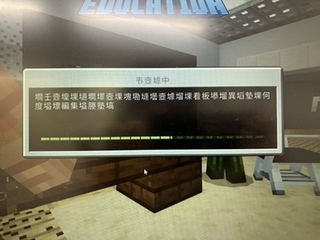
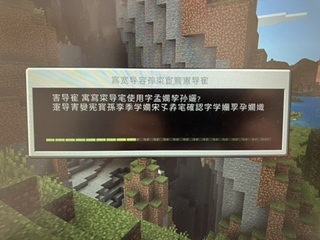
I am writing to report a critical font rendering and character encoding issue in Minecraft Education on Windows 11. Most Japanese text in the application is displayed as strings of nonsense Chinese characters (Mojibake), making it difficult to use in a classroom setting.
[Symptoms]
-
Sign-in and Loading Screens: As shown in the attached screenshots, the text on progress bars and buttons is corrupted.
-
Menu and Settings: Almost all Japanese text within the application, including the settings menu, is improperly encoded.
-
This issue persists across the entire application, not limited to specific worlds.
[Environment]
-
Minecraft Education Version: v1.21.93
-
OS: Windows 11 Pro (Version 24H2)
-
CPU: 13th Gen Intel Core i7-1355U
-
RAM: 32GB
-
GPU: Intel Iris Xe Graphics
[Troubleshooting Steps Taken (Already Attempted)]
-
Restarted the application and the PC.
-
Re-selected "Japanese" in the in-game language settings.
-
Verified that "Beta: Use Unicode UTF-8 for worldwide language support" is UNCHECKED in the Windows Region settings.
-
Performed "Repair" and "Reset" for the app via Windows Settings.
-
Updated the Intel Iris Xe graphics drivers to the latest version.
[Inquiry] Are there any known issues regarding Japanese font rendering specifically for the latest Windows 11 update (24H2)? If there are specific font cache clearing methods or command-line arguments we should try to resolve this encoding error, please let us know.
I have attached screenshots of the Sign-in and Loading screens for your reference. We look forward to your guidance.
Best regards,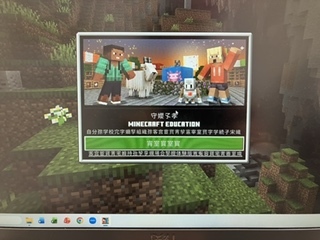
-

Hey there!
Sorry for the delay on this, let me check with the team and I will let you know if I hear anything on it!
0 -
We were wondering, does the error still occur if you update from 1.21.93 to current retail (1.21.132)?
We were not able to reproduce this error on our end.
0 -
I would like to request a verification of an issue occurring in the classroom. However, I am currently unable to do so because version v.1.21.132 has a critical bug that prevents proper operation.
Could you please address the bugs in v.1.21.132? If that is not immediately possible, I would appreciate it if you could provide a stable alternative version. I need to confirm that no text garbling (mojibake) occurs, so a version that is both stable and free of encoding issues is necessary.
0 -
Hey there!
What critical bug are you referring to that you believe v1.21.132 has?
0 -
The critical bug I’m referring to is the Code Builder Navigation Issue (documented in my previous report: [Urgent Bug Report] Code Builder Navigation Issue in v1.21.132).
Currently, this navigation failure is acting as a total blocker. Because the UI/navigation within the Code Builder is broken, I’m unable to perform the necessary steps to reproduce or troubleshoot other secondary bugs in this version. Essentially, we can't fix 'B' until the navigation in 'A' allows us to reach it.
I’ve prioritized that navigation report because, until it’s resolved, further testing and implementation in v1.21.132 are effectively at a standstill.
0 -

Hey Rei,
Thanks for the confirmation, and confirming that this issue exist in 1.21.132.
I've updated the team, and hopefully we can look into this deeper. Thank you for your report!0
Please sign in to leave a comment.
Comments
6 comments