No Internet Connection

I keep trying to sign into Minecraft: Education Edition on my Chromebook, but it keeps saying I have no internet connection, but I am connected to the wifi in my home. this has never happened to me before with Minecraft education. please help!
-
Official comment

Hey Daniel,
Were currently working with your schools Administration team, ZScaler, and google, to get to the bottom of what's causing this for your school! Hopefully we can find a full fix soon!
-

Hey there!
Sorry to hear you are running into some issues logging into Minecraft Education. Just had a few questions to help us support you further:
1.) Does the issue repeat on a different device as well?
2.) Are you on the latest version of Minecraft Education?
3.) Can you test on a school network to see if the issue repeats there?
4.) Is this a commercial account or school managed account?
5.) Can you please provide a screenshot of the error (no personal info please) so we can support you further?
0 -
Hi Danny! here are the answers to some of your questions.
1. i think so
2. Yes
3. i cant test it at the moment
4. School managed.
5. it wont let me upload the image.
hope this helps!
0 -
Hey Daniel,
Thanks for the information!
It sounds like their may be an on device proxy causing you issues. I would recommend reaching out to your IT Administrator to see if they can look into things a bit closer! If they have issues, have them reach out to our team!
Let us know if you have any additional questions, or concerns!
Thank you!0 -

Heyo! I've been having the same issue with logging in as well, and it's starting to get a bit annoying. I really want to play on my phone!
0 -
Hey there,
Sorry to hear you are running into some issues with this still. Since this is a school managed account you will want to reach out to your school's IT admin and let them know it is impacting your learning progress.
0 -
Hi guys, I may know the cause of the issue.
To confirm I am correct, Daniel, can you tell me the Chromebook version?
0 -
i have a chromebook 3100, with Version 141.0.7390.135 (Official Build) (64-bit). hope you get your answer from this!
0 -
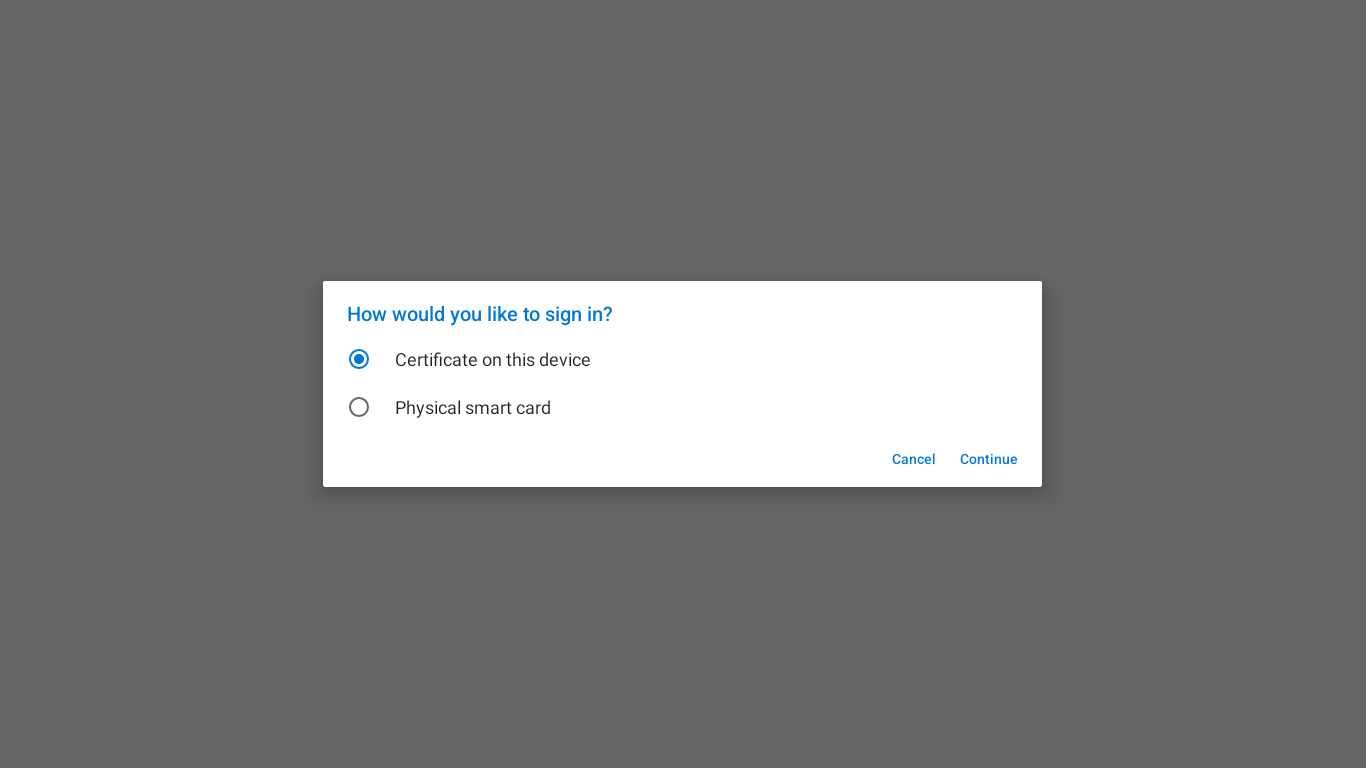
hey so i just tried logging in again, and it just keeps showing me this screen asking for either ¨certificate on this device¨ or ¨physical smart card¨ then after that, it brings me back to the same ¨No Network Connection¨ screen as before. just thought i should add that.
 0
0 -

it happen to also and can't log on into the game
0 -
I have network but it keep saying this and I don't know what to do?
0 -
Hey there Daniel and Marlon,
Sorry to hear you are running into some issues with this still! Starwall Records, curious to hear what your thoughts were on it!
Our team is still thinking proxies, content filters, virus protection or firewalls could be interfering here. Was anyone able to reach out to their IT Admin about this issue? What proxies, content filters, virus protection and, firewalls are on your devices and networks?
Does the issue replicate from another Wifi network?
0 -
it does replicate both in and out of school, and i had zscaler on all the computers ive tried to log in with
0 -

You need to check the `chrome://policy` page to confirm whether the critical policy "Enable usage of ChromeOS CA certificates in Android apps" is configured.
0 -

I can't load into my world!
0 -

omg, i'm also having the same problem! i've reinstalled Minecraft edu several times already and it keeps saying "no network connection" including the options to either choose a certificate for the device or a physical smart card. this has also never happened to me before and also feels like the global resources reset back then around the Covid era where people also couldn't log into Minecraft edu. Support team, please fix this!
0 -

OH I HAVE THE EXACT PROBLEM!
I live in New York city and I also got the error 2604!
Well it's frustrating, NYC DOE is trying to fix this issue. Well we don´t know when it will get fixed but, it's guaranteed that it will get fixed in June.
0 -

Hey Danny! I'm not thinking that any of those are true. This is because I have a personal Android device, and even that gets the error 2604. What I believe is that the certificates are simply not being supported by older versions of Android.
I looked online and realized that the Chromebook that "Daniel Smith" currently has has the Android version 11, which is lower than 13, the one I have. Latest versions of Android seem to work with the certificates. Also, I can back up this statement because Daniel and I both have old versions of Android and we are both getting the same issue. This issue is not based on any of those things your team thinks, it is simply just the version of Android.
0
Please sign in to leave a comment.
Comments
18 comments