Invalid Tenant ID and Expired Token

When we are trying to run our server, we get this message "Invalid Tenant ID" see attached picture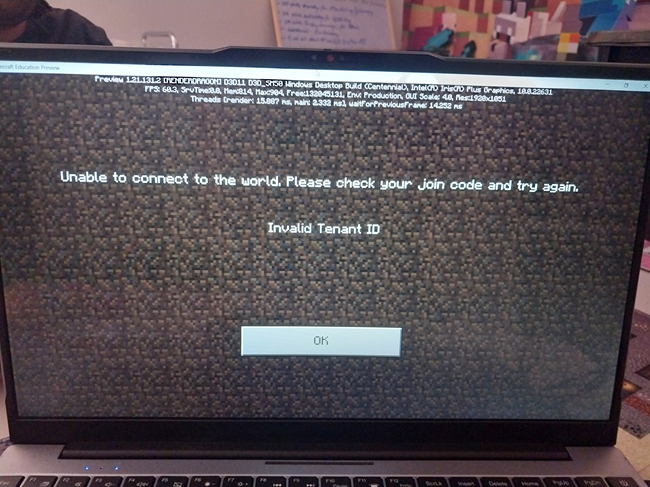 Also our token has expired. What is the exact process to acquire a new token? How long do these tokens last for and how often will we need to acquire a new token? The last time we successfully ran the server was 19th December 2025.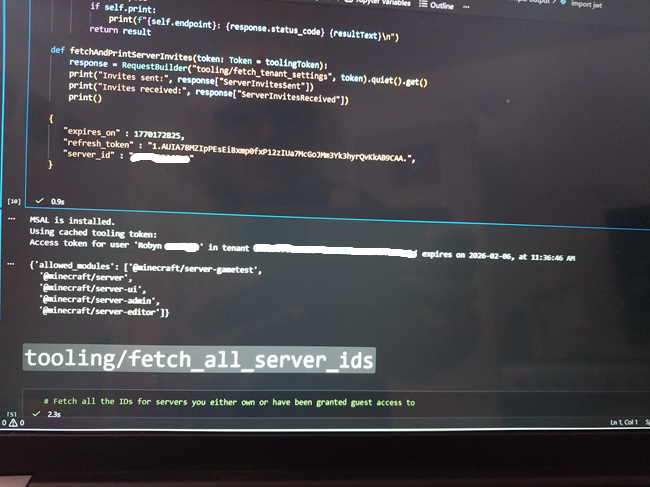
I've checked my Tenant ID in my Microsoft Entra account and it is correct as it is on the server template config as in pic above.
How often are we going to come across this issue? We need a foolproof fix so we can run our server continuously and/or know the correct steps to fix this whenever we sign in.
-

Hey there!
Sorry for the inconvenience and thanks for the patience on this! The team is looking into it as it is still being worked on for the full release.
1 -

We face the same issue but we were never able to connect to the server in the first place. Running on linux, client MacOS
0 -

I am having exactly the same issue. I spent almost an hour with a help desk rep and we could not solve the problem. My students connect to the worlds I host to take class, So without this feature I am pretty much unable to teach. Pretty please, help!
0 -

I also need help with the same problem
0 -

same issue for me too. Is there any solution?
0 -
Dear Devs:
I solved my "Invalid tenant" problem by making every student upgrade their version of Minecraft.
Before this, I had another login issue that made my head spin out of control, but I solved it simply by correcting my clock, which was out of synch at that time.So, if you could PLEASE instead of stating "Verify your account" and "Invalid tenant" say "Check your clock" and "Upgrade your Minecraft version", I'm sure it could save A LOT of time to everyone, your help desk people included.
Thanks!
0 -

Hey I have a project due for school, I need this fixed please. I downloaded lasts version still happens. what is going on?
0 -

i also face the same issue and i enter the join code and it shows the server details and i click join or comfirm whatever you want to say for 2 seconds its joins but not fully and it says incalid tenrnt id and i have been playing for less then a month
1 -
Hey everyone!
Sorry to hear you are running into some issues with this. This is a recorded bug that more and more people are reporting and we have a bug report filed for. Your voices are being heard and shared with the dev team. Sorry for the inconvenience and thanks for the patience on this.
Here are a few things to try:
In the meantime you can have them make sure that all users are on the latest version of Minecraft Education. If you are on Android/Chromebook devices, you can turn off "Automatic DNS" in your Private DNS settings. Let us know if that last step helps with the issue at all!
0 -

We had this issue all afternoon on Friday. Today, I noticed a lot of blocked requests on our web filter for "geo.hivebedrock.network" from all of the accounts that had been having this issue. Did Microsoft recently acquire/repurpose this URL for its servers? Possibly worth checking network logs and allowing this URL, it could be related.
0 -
Hey Will,
Thanks so much for that insight. There shouldn't be any changes in that way, but I will definitely make a note of this as we investigate!
0 -
Hey Will Yates! I mentioned this to the team and they were interested in a Fiddler Network Trace. If I make a ticket for us and send over some instructions, would you be willing to gather a network trace for us?
0 -
I would be happy to provide some data if it helps. FWIW, we did not have the issue at all today, post whitelisting that URL.
0 -

Hi! I noticed that when updating the game several students don't have enough room on their computers to download the update. Our school has been running on 1.21.93 for awhile now and have just run into this problem. I was wondering if there was a way to update the game to a set update number. The Tenate Id problem wasn't solved on our side with just updating and now some students can't participate as they run on different versions. If theirs any way that this can be solved I would be grateful!
0 -

We have several classrooms at our school that are having this issue.
0 -
Hey all!
Will - Sounds great, thanks for volunteering! I will make a ticket for us and send some Fiddler instructions there.
Avila - Sorry to hear you are running into some issues updating everyone due to space on the device. We aren't able to give out previous versions or anything like that, as can perpetuate these types of issues. They will need to clean up some space on the devices to make some added room to download the update so everyone is on the same update. Thanks for the understanding.
Mark - Can you confirm everyone is on the latest and same version of Minecraft Education?
0 -
Danny - checking on version. Just sent our 4th grade team to make sure to check the Play Store if there's an "Update" button.
0 -
Awesome, thanks Mark. And yeah if you are just able to have the teachers confirm that the users that cannot join and the users that can join all have the same version number written on the home-screen that would be great.
0 -

I think we're having the same or similar issue here. We installed Bedrock server version 1.21.132.1 on Ubuntu linux yesterday, added it to the portal, and then authenticated. One client (me) was able to connect with client 1.21.132. I'm the only one connecting at the moment.
Today, I received "invalid tenant ID" on the client, and when I restarted the server process I saw this error:
Error code: 400, {
"error":"invalid_grant",
"error_description":"AADSTS70043: The refresh token has expired or is invalid due to sign-in frequency checks by conditional access. The token was issued on 2026-04-28T15:44:13.7734022Z and the maximum allowed lifetime for this request is 28800."
}I saw Will's mention that the host geo.hivebedrock.network needs to be whitelisted, but there was no port mentioned. We allow outgoing traffic from the bedrock server to ports 80 and 443 of any destination - I don't suppose a different port needs to be allowed?
0 -
Hey there Todd,
Sorry to hear you are running into some issues with this error as well. And just to confirm, everyone is on the latest and same version of Minecraft Education, correct?
And when you mentioned "Bedrock server", are you referring to the server and the steps for the server listed here:
https://edusupport.minecraft.net/hc/en-us/articles/41758309283348-Dedicated-Server-FAQ
0 -
There are no other clients connecting, so yes, all clients (just me) are using the latest and same version of the Minecraft Education client.
Yes, I followed the guide "Dedicated Server Tooling and Scripting Guide" at the URL you linked. The bedrock server process gives a message "Server XX successfully hosted in tenant..." on start.
Since posting, I now see one new error in the server console:
[2026-04-29 16:53:30:320 ERROR] Error code: 0
[2026-04-29 16:53:30:320 ERROR] Could not contact Services to update server0 -
Hi Danny, it happened again: the auth token has expired. The timeline:
- at 10:40 one of our Global admins logged in to authenticate the startup of the bedrock server
- I watched the token being refreshed throughout the entire day (the value of "expires_on" in file edu_server_session.json )
- the last successful refresh was at 18:33
- the token expired at 19:47
- after that the journalctl output shows error messages like this: "error":"invalid_grant","error_description":"[session token]: The refresh token has expired or is invalid due to sign-in frequency checks by conditional access. The token was issued on 2026-04-29T16:39:02.9019609Z and the maximum allowed lifetime for this request is 28800." (Note that 16:39Z is 10:39 in local time)
So it looks like the Ubuntu bedrock server cannot run for more than 8 hours after being authorized. Is there anything that we can do to allow these servers to run longer? Thanks!
0 -

Hey Todd Trann,
We're investigating deeper but we suspect the Sign In Frequency conditional access policy could be affecting your token expiration:
Sign-in Frequency (SIF) is a session control policy in Azure's Conditional Access system. You likely have set an option like "Require sign-in every N hours" to 8.
To confirm, or modify:- Sign into the Entra ID Admin Portal with your Global Administrator (or relevant Admin) account → Conditional Access → Policy → Session
- Look for:
- Sign-in frequency
The setting can be configured for specific users, groups, or everyone in your tenant. It can also be configured based on platform (OS), location, and device state (compliant/ hybrid joined), among other things. There is some support for scoping the requirement to certain resources (Conditional Access for Agent Identities in Microsoft Entra - Microsoft Entra ID | Microsoft Learn), but we're confirming whether it could be scoped to not apply specifically to Education Dedicated Servers.0 -
You likely have set an option like "Require sign-in every N hours" to 8.
That makes sense, and yes, we do have that option in place for Global admins. We will look at changing the Dedicated Server Admin portal permissions. Thank you for your reply Kaleb, it was helpful.
0 -
Glad we could help!
0
Please sign in to leave a comment.
Comments
25 comments