i cannot get into minecraft education

i kept putting my email and it said we are not able to sign you in it said 'try checking your internet connection' so i did, my internet was perfect but it still didnt work at all. i need to get it fixed.
-

Hey there!
Sorry to hear you are running into some issues getting into Minecraft Education. Just had a few questions to help us support you further:
1 - How many users do you know running into this issue?
2 - Can you send a screenshot of the error you are getting? (no personal info please)
3 - Does the issue replicate when connected to another network?
1 -

私もです。
古い画像を引用すると、次の画像と同様の意味の画面が表示されます。
https://edusupport.minecraft.net/hc/user_images/01J0J29674A32DFQB3MNF25A3T.png
時刻の同期は実施済み。
違う端末、違うネットワーク、再インストールでもだめでした。
0 -

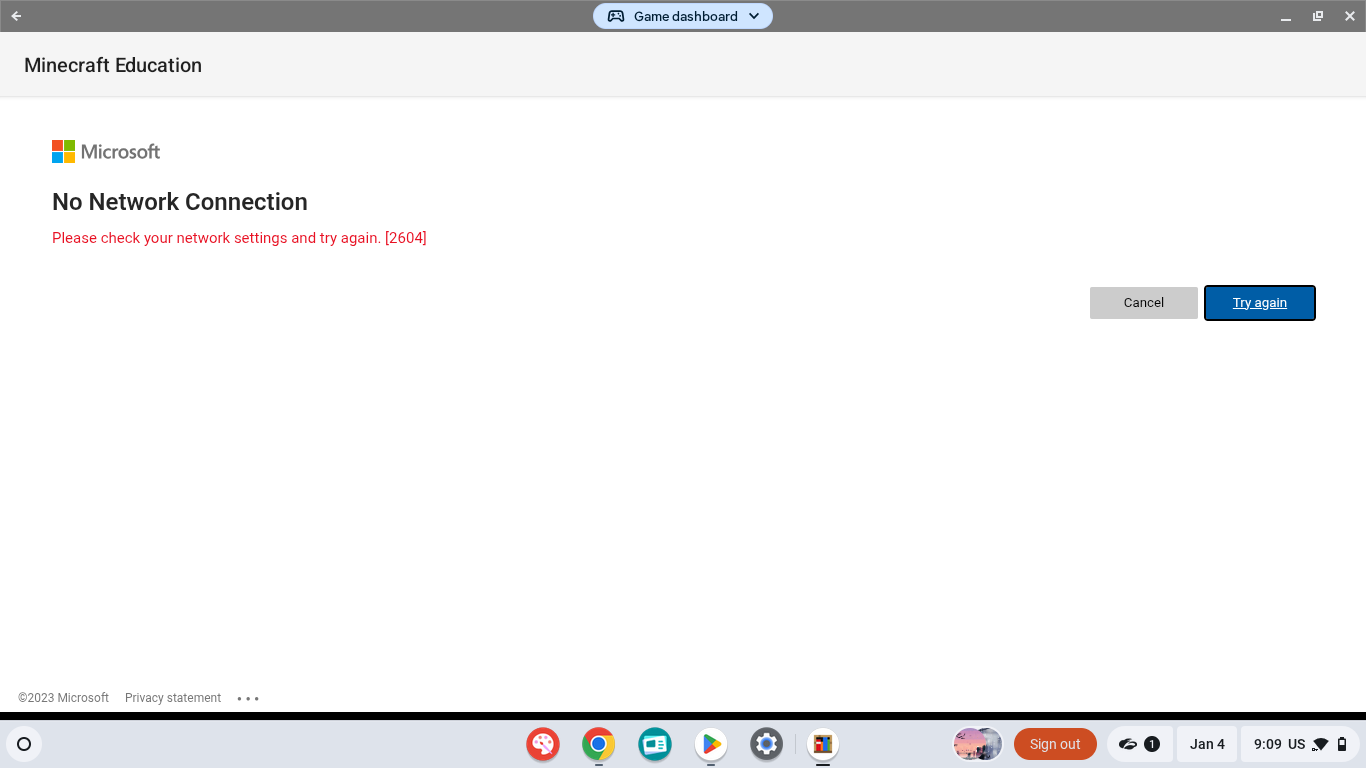
i'm have the same problem and her is the picture . I try to sign in minecraft but it doesn't work for me
0 -
Hey Ta Sa,
Sorry to hear you are running into some issues. Are you getting any other errors as well or just the "We are unable to connect you..." error? If it is just the second one, I am surprised your time sync steps did not work. Can you walk me through the steps you did?
As for the 2604 error for Maiza,
Sorry to hear you are running into some issues with the 2604 error with Chromebooks. This has been an odd one that seems to be related to Sectigo changes to certifications that affect how they're used in Single Sign On. There is not much we are able to do on our end for this issue unfortunately. That being said, we do have some steps to give a try (If you are not the IT admin, you will need an IT admins support for these steps) :
1 - You could try our preview app on Chromebook! More info on that here (https://edusupport.minecraft.net/hc/en-us/articles/23498937165844-Minecraft-Education-Preview-Program) which is version 1.21.11x and will soon be 1.21.13x, as they have newer versions of the Authentication libraries (and so may have some update that other Office apps have which is making them work). We do expect other Office apps to be affected as they update.
2 - Check if the certs are available to both the browser and the play store apps:
- Upload new certificates to the Google Admin Console under Menu > Devices > Networks > Certificates, ensuring the ChromeOS platform is selected for Certificate Authority deployment.
- Enable certificate synchronization for Android apps via Menu > Devices > Chrome > Settings > Users & browsers > Android apps > Certificate synchronization ("Enable usage of ChromeOS CA certificates in Android apps").
- Allow time for policies to sync; (you can see the applied policies on the Chromebook by navigating the browser to
chrome://policy to see if the certs and policies configured have propagated on the client-side).
3 - We are pretty confident this only affects older ChromeOS and Android versions as ChromeOS 134 and Android 16 seem to not be affected. You may also try updating your ChromeOS devices (if possible).
0 -
Danny.
私は次の手順を行いました。
https://edusupport.minecraft.net/hc/en-us/community/posts/25430824260372/comments/43554476625044
手動での設定に変えたり、過去に遡ったりしましたが、結果は変わりませんでした。
他にエラーはありません。
0 -

i am having the same issue. error code 2002
Correlation Id: 3cb3aa68-17ff-42c7-96b3-c42222ce80b1
Timestamp: 2026-01-07T21:05:08.000Z
DPTI: 251A4F72-D65E-4AD0-B985-822A3ADE483A0 -
Hey Ta Sa,
Thanks for the clarification, yup those are the steps I would have recommended. It is very rare those steps don't help with this error. Do you know any others experiencing it? Does it happen when connected to another network? What OS version are you on?
Angelica,
Sorry to hear you are running into some issues with 2002. Does that error replicate when connected to another network? If you have not tried yet, could you? Also, what proxies, content filters, virus protection and, firewalls are on the device and network? Is it a school issued device or a personal one?
0 -
Danny.
別のネットワーク、別の端末でも発生します。
Windows11です。
0 -

Hey ta sa,
Are you using any kind of parental controls, or software-based firewalls, on these systems? Such as a Filtering Agent?
Generally 2002 means that a connection to one of the Microsoft Authentication servers is failing. If you use any of these you'll want to ensure that all of the URLs Used by Minecraft Education and the Microsoft 365 IP addresses and servers are allow listed. You might try temporarily disabling filtering on a device to try and isolate it to this type of issue.
Let us know if you have any additional questions, or concerns!
Thank you!0 -
Angelica Fox.
I would recommend similar steps for your 2002 error!
Can you also verify what Platform your issue is occurring on? (Windows, IOS, Android, etc).
Let us know if you have any additional questions, or concerns!
Thank you!0

Please sign in to leave a comment.
Comments
10 comments