Students enter shared world in adventure/survival mode, can't change

I am starting to use the Schools Reinventing Cities world as a project, but have run into several issues. Probably the most important is that students enter the world in either Adventure or Survival mode when I set the world to Creative. Even if I give a student operator privileges, they are unable to toggle the mode and it resets. This happened to me as well, and I had to delete the world and reinstall.
The other issue we found a work around to, but was still annoying. The world starts in a town hall with a world map, but the map was not visible to all players. It was just a blank wall, and I had to teleport them in.
-
I would really appreciate help with this! I'm not sure how I can complete my grant funded project without this ability, which will impact my chances of being able to keep funding. Please advise.
0 -

Hey there!
Sorry to hear you are running into some issues with Minecraft Education and changing mode difficulties.
Which worlds is this happening in? Is it any worlds or specific ones? If it is specific ones, which ones? If it is happening to any procedurely generated normally generated worlds, then there would be an issue, but if it is happening in certain worlds created Minecraft Education that is working as intended. There are many worlds in the Library that have mode switching disabled because they are meant to be played in a specific manner. Let us know!
0 -
Thanks!
It is the Schools Reinventing Cities world. I want students to be able to use the green energy and conservation resources associated with it. The initial issue is that the portal at the start of the world had a map that did not appear for all students. They just saw a black wall. The workaround for this was to teleport them, but that seemed to keep them in adventure mode. I changed my game settings at the beginning to creative and I am in creative automatically when I enter the city from the portal, but when students join, some of them are able to be creative, but others are not and I can't change their settings with commands, and they can't change it even if I give them operator privileges. If I have them each open the link to the world, starting their own, will they be able to change it? If not, is there a way to download the resource pack separately?It also seems like they would not be able to access the world I started at home if I am not online and in it. I would like my classes to be able to work collaboratively, but I have 8 classes. Is there a way to establish a permanent link they can access at home and when I am not in the world?Are there different levels of user permissions with Minecraft Education licenses? It looked like from some articles that I should be able to assign a world as a teacher, but I don't see that function.I know this is a lot of questions. Feel free to direct me to relevant FAQs, and if there is an educator you can recommend to mentor me in the Schools Reinventing Cities challenge, I would really appreciate it.0 -
I would still appreciate help with this. I tried two more workarounds - to have them click on the link in the Schools Reinventing Cities workbook. They are unable to access this or any of the worlds from the library. They can see them, but not open them. My other idea was to export a copy of the world, upload it to Google Drive and have them be able to download it to their devices and open in in Minecraft EDU. They are also unable to do this. I'm pretty frustrated at this point. Having read some more it seems like we would have to set up a dedicated server to have a permanent link, but our IT admin is against this unless we are able to turn off the chat function.
0 -

Hi, tagging on to this! My students keep experiencing the same issue where one student will randomly be forced into adventure mode and NOTHING can change it. We've tried the /wb trick in the commands and it doesn't work. We've tried /gamemode. The only success I've had is a temporary workaround where we used a command block with the command /ability @a worldbuilder true with redstone always active and the command repeating. This temporarily overrides the limits on adventure mode, but if the block breaks or the student leaves the range of the block then it will go back to adventure mode.
Maybe you folks could liase with the devs for the Schools Reinventing Cities mod to investigate this issue?
0 -
Hey there Matt,
Sorry to hear you are running into some issues with this as well. Just had a few questions to help us support you further:
1 - Does this issue only happen in the "Reinventing Cities" world? Any others?
2 - Could you tell us a bit more about what happens when one student is forced into Adventure Mode? Does it happen to the same students every time? Does it happen to lets say every 10th student to login or every 15th student to login every time? Any consistency that you can notice? Is it only one student each time or is it multiple?
3 - For your work around, if you hide the block wayyyy deep down somewhere in the world randomly and add
/tickingareacommand to it, it should load the chunk regardless if the student is close to the block or not.0 -
Hi Danny,
1) yes so far this only happens in the Schools Reinventing Cities world. We're running the TDSB-aligned Toronto world now as a part 2 of our project and so far it hasn't had the same problem. I don't know if the unique items from the Schools Reinventing Cities world have some broken code or something, but as they are not present in the Toronto one, once we switched over it seems to have stopped forcing kids into adventure mode.
2) Random users will be forced into adventure mode, even the owner of the world. In some games they will be adventure, in some they're fine and left in creative. It's different every time. I haven't seen a discernable pattern, it's just been a case of in some worlds they're in adventure and in some worlds they're not. I've tried the sync bug and it didn't work. When I'm in their settings, I will set their personal game mode to default or creative and literally watch it tick back over to adventure a moment after I close the dropdown menu. I don't even exit the settings and it's already in adventure mode. It's like the game code randomly decides to make a player adventure mode and then the code overrides all attempts to put them back into creative, except with the command block trick (so far).
3) Are you saying to add this command to the /ability wb true command on the same block? Does the new command increase the range of the command block past 50 blocks?
0 -
Hey there!
Gotcha thanks for all this info. I am not sure if there are any updates with the world itself being fixed, so I went and dove deeper into your work around for some upgrades. I experimented around with different commands, and this is the one that worked best for me.
It achieved a "hard-to-find", Redstone based CommandBlock set that won't deactivate regardless of how close or far to the setup you are, and keeps all users in Creative mode without needing to give them world builder status. This is how I achieved it:
1 - This was my setup. (Ignore the photobombing horses haha) Make sure to turn the lever to "On" so the redstone is glowing when you are ready and set up.
You should place this somewhere in your world deep down where no one can find it. Anywhere in the world is fine. Please take note of your coordinates. My starting coordinates in this example were 0, -60, 0. They will be important later. Yours will be different, but that is no problem.
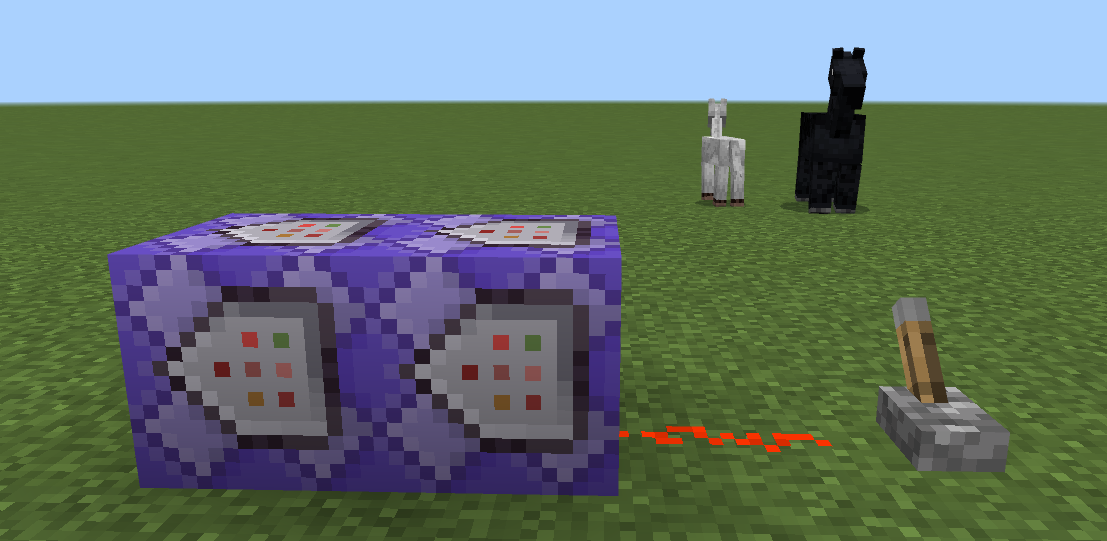
2 - Your first command block (right) will set everyone into creative mode: /gamemode creative @a
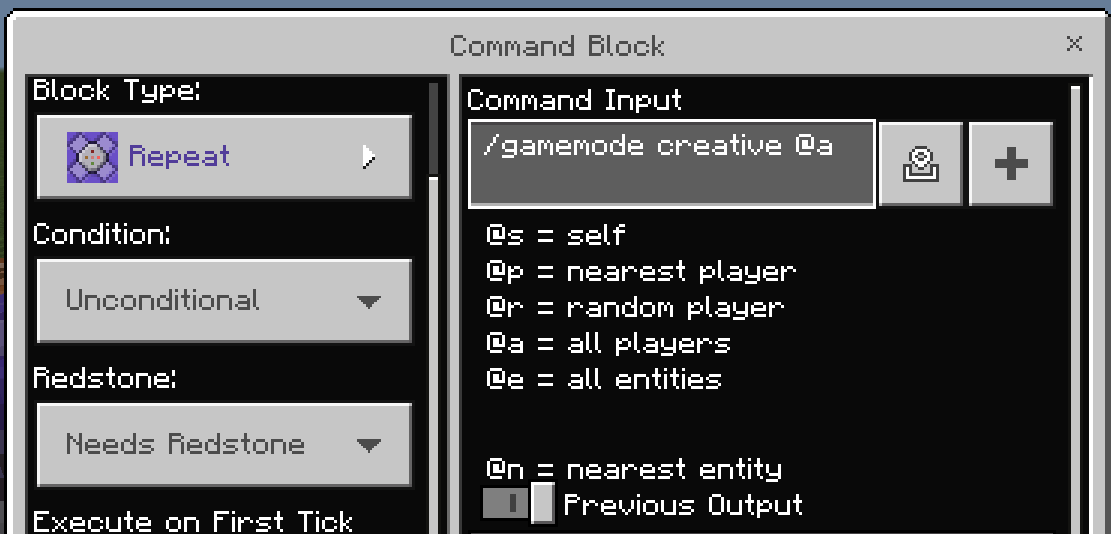
3 - Your second command block (left) will look like this. This is needed so that chat is not constantly filled with Commandblock messages.: /gamerule sendcommandfeedback false
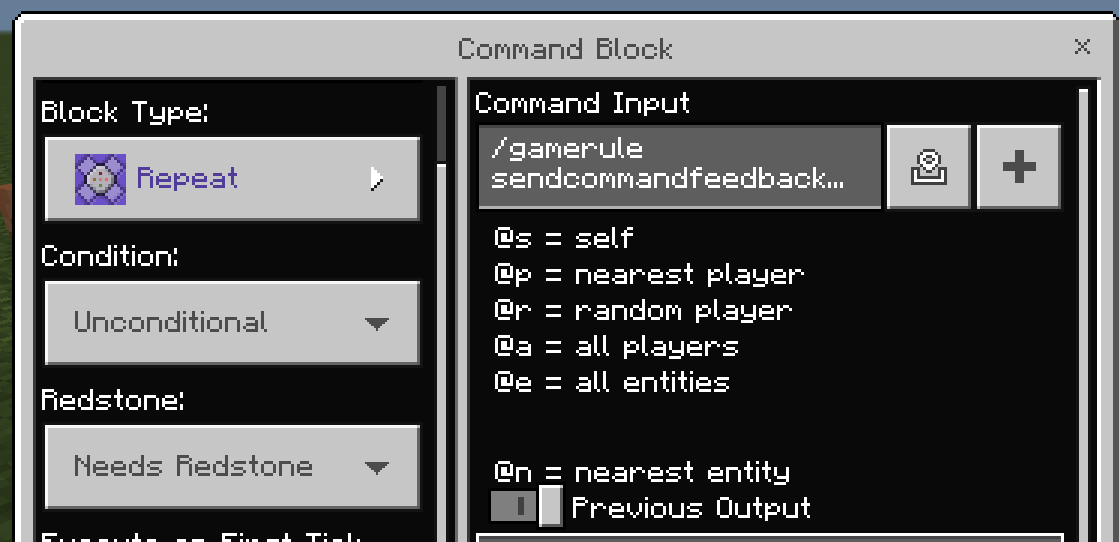
4 - Lastly, you should enter this command (but change the coordinates to be roughly +and- 10 in the Y direction and around 20 in the X and Z direction. The "Test" part is just whatever you want to name your ticking area and that is what I called it, you can call it anything you would like.
Basically what this does is add a ticking area of that size to your world. You need to make sure your redstone commandblocks are within your ticking area space. Ticking areas are chunks of the game that are always loaded, so regardless of if there are students near it or not the command blocks should remain active. You don't want the area to be too big or it can lag your world, but you want it big enough that you are sure it contains your command blocks.
Push "T" to open the chat window. Then type in your command. This is what I used: /tickingarea add -20 -50 20 20 -70 -20 Test
It should be persistent even after a relog. Let us know how that goes for you!
0
Please sign in to leave a comment.
Comments
8 comments