i cant sign in

it keep saying We were unable to sign you in. Please make sure you are signing in with your school or organizational account and try again i dont know what to do
-

Hey there,
I'm Kaleb with the Minecraft Education Support Team! I'm happy to assist you today!
I understand how frustrating it can be when you can't sign into Minecraft Education. Let’s work together to get you back on track.Generally, when we have users report that they are unable to sign in. it's often that they are trying to sign into the wrong account. Please ensure that you're signing in with your work or school account and not your personal account.
Your work or school account will end with a domain like "minecraft.edu" or "schoolname.org". It generally won't end with "Outlook.com", "Gmail.com", or similar.To assist you further, I have a few questions:
1.) When did this issue start occuring?
2.) What devices and Operating systems are experiencing the issue?
3.) Any devices it does not reproduce on?
4.) What version of Minecraft Education Edition are you running? This can be confirmed in the lower right hand corner of the main menu
5.) Did you have to type username and/or password or did it try to sign in automatically before you saw the error?
6.) If none of the above solves this issue, could you provide a screenshot of the error you're receiving? This visual information will allow us to investigate the issue more effectively and provide a faster resolution.
Note: Please do not send any information that could potentially identify you, such as usernames, passwords, school name, or anything similar.Let us know if you have any additional questions, or concerns!
Thanks,
0 -

This happened to me to before. All you have to do is reload it, or if your on a computer you can check your internet.
0 -
hello thank you for the help but it still not working
1 the issue started 3-4 month ago
2im on my pc
3 i dont know what third question mean
4 im on v1.20.13
5. i only need to put my account username then is strated happning it still work on schoo chromebook but it doesent work on pc
sorry for wait-1 -
Never mind i found the proble the time was wrong but for me right now it is 11:05 pm but when it in sync it 8:05 my computer time is worng by 3 hours
0 -

Gotcha, glad you found that because that is indeed the fix for this pesky error!
If you have any future questions, you know where to find us!
0 -

mean while me i even i already have account like Minecraft education edition account and Microsoft account 365 still can't find my account in Android's and IOS?
0 -
Hey there,
Sorry to hear you are running into some issues. I do not fully understand what is happening. Could you provide some more info on your issue? Do you have a Minecraft Education license and are struggling to get it logged in on your Android and IOS device?
0 -

i sign in my microsoft account and i downloaded minecraft education and i put my email address in and it is not working please help me
0 -
plz answer fast it is night in our land
0 -
Hey there William!
Sorry you are running into issues singing in.
Are you trying to sign-in with a commercial or school-issued license?
Have things worked prior?
What error message do you receive?
0 -

Hello Minecraft Assist Team. My brother is having an issue on loging into his account.
\
His e-mail is fully perfect e-mail (because it is school's e-mail that give) but still, it says WE ARE ENABLE TO SIGN YOU IN.
PLEASE MAKE SURE YOU ARE SIGNING WITH YOUR SCHOOL OR ORGNIZATIONAL ACCOUNT AND TRY AGAIN. :( I know you are busy but can you tell me why this is happening and how to fix it? Thank you. :)
0 -
Hey there!
Sorry to hear you are running into some issues with Minecraft Education and that error.
What device are they on?
0 -

Hi support - sorry to necro this thread... my daughter is having this issue too. Her email address is the correct school version and the app works on other PC's - just not the one she has...
It has previously worked on this PC, but did a reset and clean - now it just does not work. Any solutions
0 -
Hey Evelyn!
No worries! Is it the same error as the first screenshot above? If so, try these steps out:
We have found that for some users have the issue because their time zone or region is off.
Could you confirm under Windows Settings > Time and Language > Date and Time that your time zone and region are right, and hit the "Sync Now" button?
See the screenshots below for both Windows 10 and 11
Windows 11: 1. From Windows Settings on the sidebar select "Time and Language."2. Select "Date and Time"
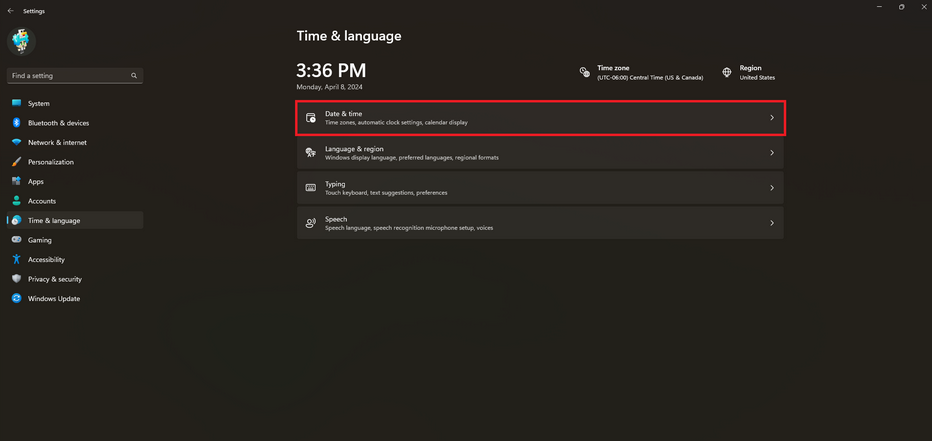
3. Ensure Timezone and Region look correct.
4. Select the "Sync Now" button to make windows sync the current time.
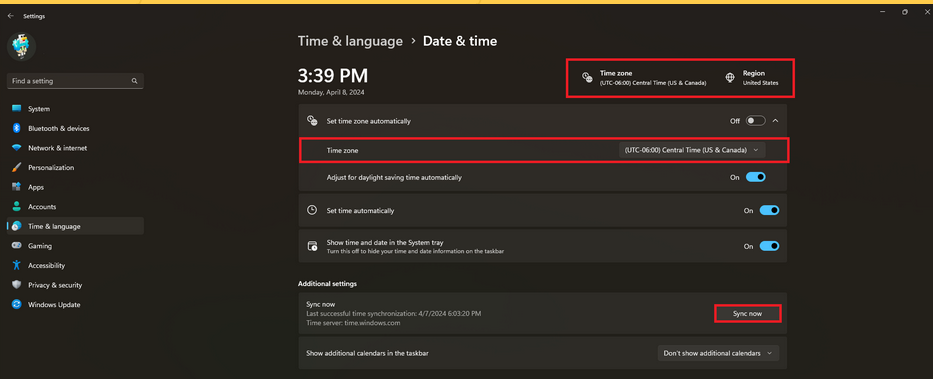
5. Open Minecraft Education. See if you can sign in again.
Windows 10:
1. Open Windows Settings and select Date and Time on the sidebar
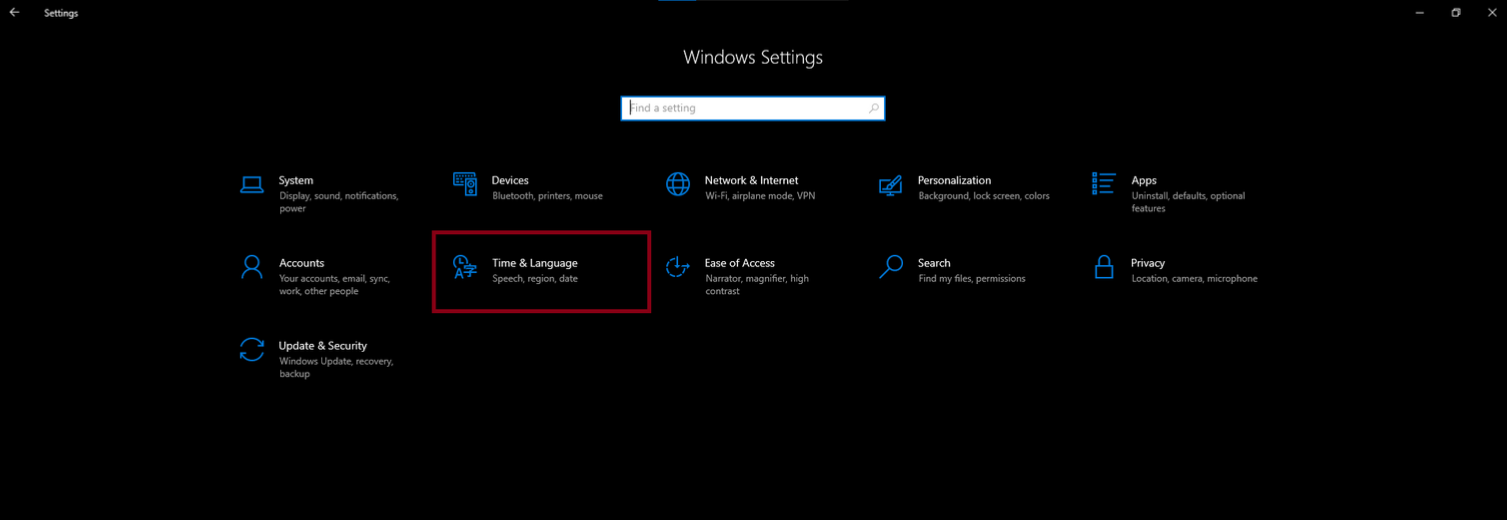
2. Ensure that Time Zone is correct and select Sync Now
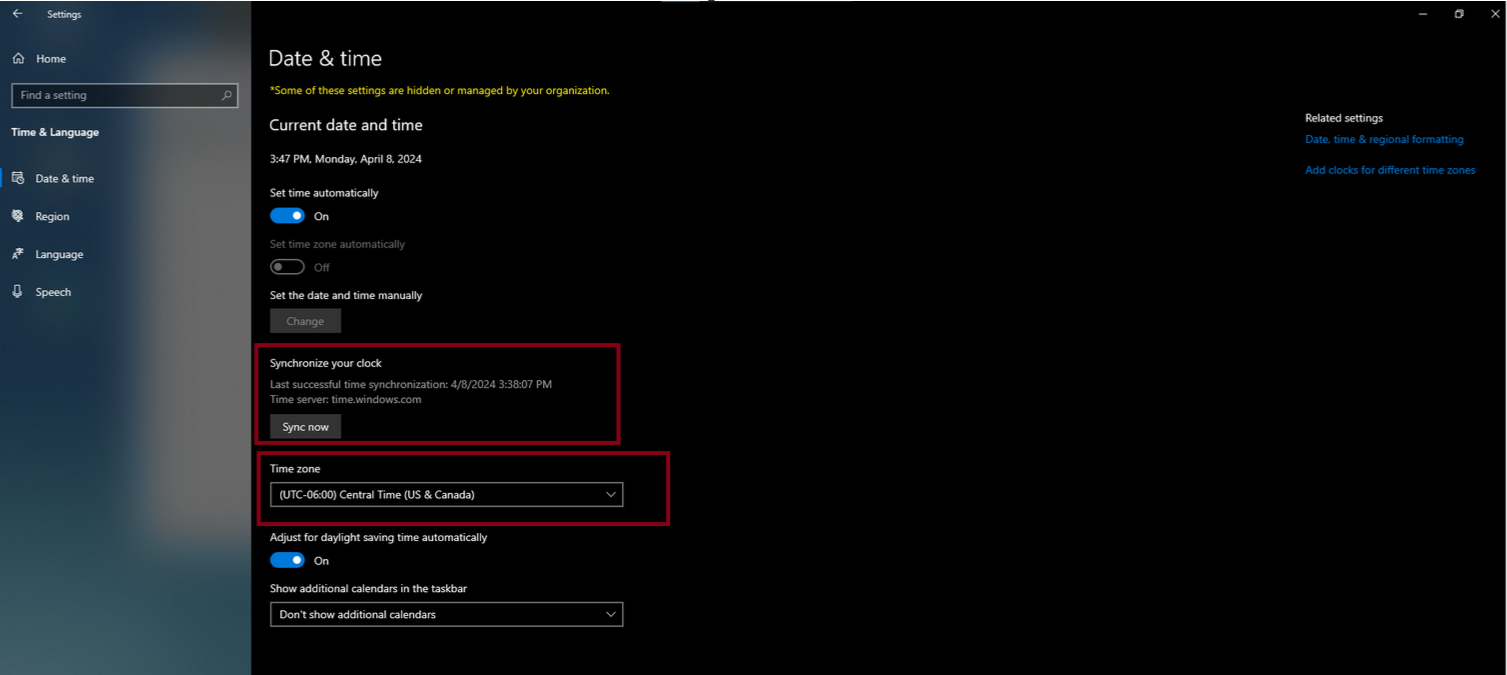
3. On the sidebar select Region and confirm that "Country and Region" is correct.
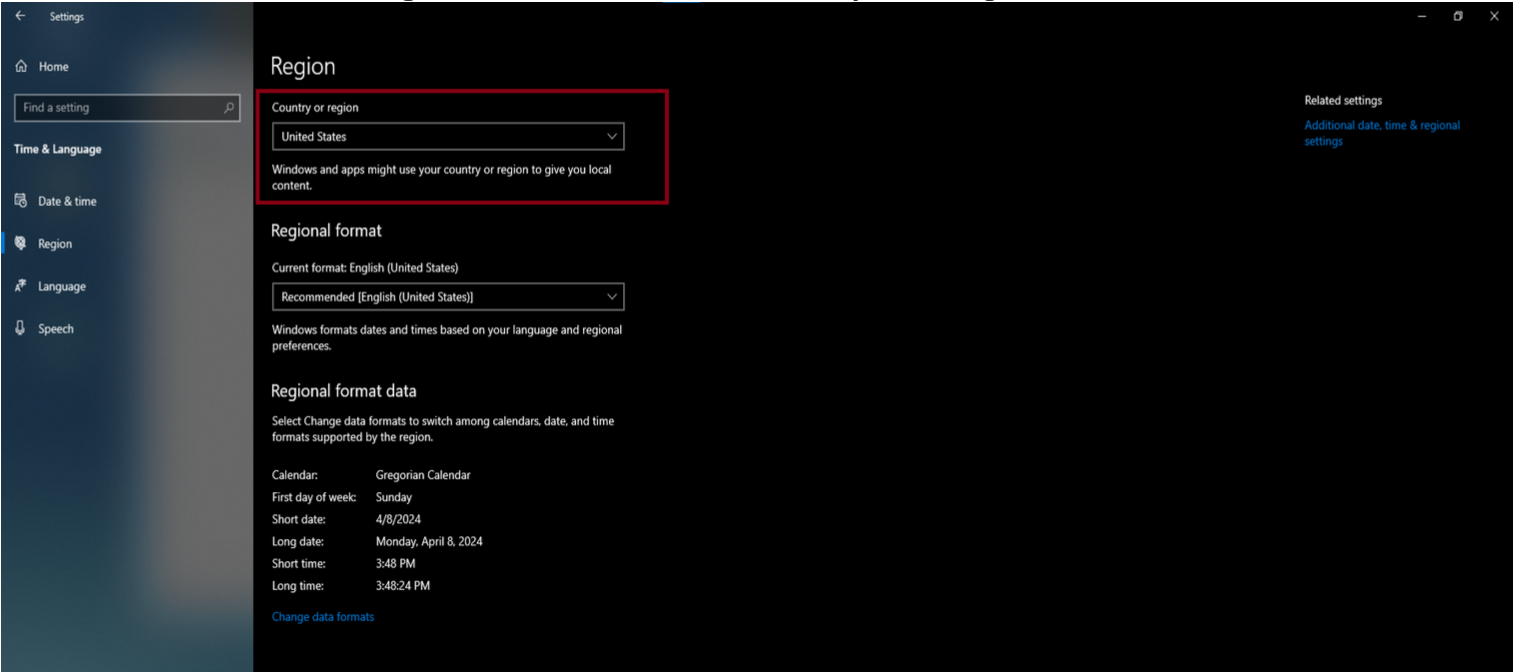
Let us know if these steps work for you!
0 -
Thanks - you are correct - it was a time issue. A little more complicated by the fact that it didnt want to allow time/date changes, but sorted now.
Cheers.
0 -

For me, it's the spinning wheel of death
0 -
Hey there Alexandria!
Sorry to hear you are running into some issues with a spinning wheel when trying to sign into Minecraft Education. Just had a few questions to help us support you further:
1 - Do you know any others running into this issue?
2 - Does the issue replicate when trying to sign-in from a different device?
3 - What device Make/Model/OS version are you running into this issue on?
4 - Have you let your IT admin know about this issue?
0 -
I don't know really, for any of the questions........
0 -
Hey Alexandria,
I would highly recommend consulting with your IT Administration Team as it appears you might be a teacher or student for your school.
Have your IT Team open a ticket with us if they can't resolve the issue from there end as they'll have a lot more access to provide us the information we need.0 -

its taking me to the wrong page
0 -
Hey there Azavier!
Sorry to hear you are running into some issues with this as well. I have the same recommendation as Kaleb above, please reach out to your school's IT admin for support on this. Thanks!
0 -

Hello, I have moved schools and when trying to login to MineCraft education with my previous school email, I get the same error - PLEASE MAKE SURE YOU ARE SIGNING WITH YOUR SCHOOL OR ORGNIZATIONAL ACCOUNT AND TRY AGAIN.
How can I change my account to my new email address without losing any of my builds etc. I have asked my old school but they are very unhelpful and not answering me.
Thank you
0 -
Hey there!
You won't need to worry about your files and worlds as they are not associated with your accounts, but they exist at a device level, which means you can manually pull them by finding them here - https://edusupport.minecraft.net/hc/en-us/articles/4404785703316-Location-of-World-Files
So if you download your worlds and make sure you make copies of them where you know where they are, you will still have your worlds with another login email address.
0 -

It just says "you need to log in" and then i click the sign and nothing happens and i try over and over and nothing works
0 -
Hey Hanady!
Sorry to hear you are running into some issues with this. Are your licenses provided by your school? If so, please reach out to your school's IT Admin for this issue. Thank you!
0
Please sign in to leave a comment.
Comments
25 comments