Dispenser Block Appearance and Orientation Issues in MakeCode

I'm having trouble placing dispensers with the correct appearance and orientation in Minecraft Education using MakeCode.
I've noticed the following issues:
1. Dispensers placed directly through MakeCode look different
When I use MakeCode's blocks.place() with blocks.blockByName("dispenser"), the dispenser is placed without the face-like front texture that a normal dispenser has in the game. It looks different from a dispenser placed manually in Minecraft.
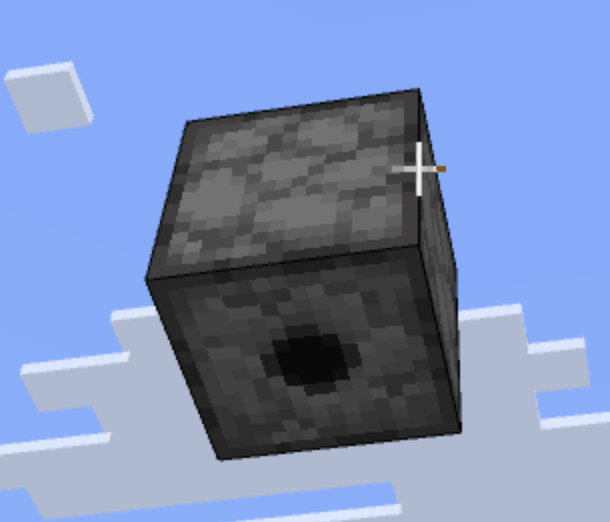
2. blockWithData does not change the dispenser's orientation
I tried using blocks.blockWithData() with different data values from 0 to 5, but the dispenser always faces downward. Changing the data value does not appear to affect its orientation.
3. Commands work in chat but fail in MakeCode
I can successfully use /setblock and /fill commands with the facing_direction block state directly in the Minecraft chat window. However, when I execute the same commands through MakeCode using player.execute(), they return an error.
For example:
player.onChat("east", function () {
    player.execute(
        'fill ~1 ~ ~ ~5 ~ ~ dispenser ["facing_direction"=5]'
    )
})
A simple command such as fill ~1 ~ ~ ~5 ~ ~ stone works correctly through MakeCode, so the issue seems to be related to the dispenser block state or how the command is handlced.
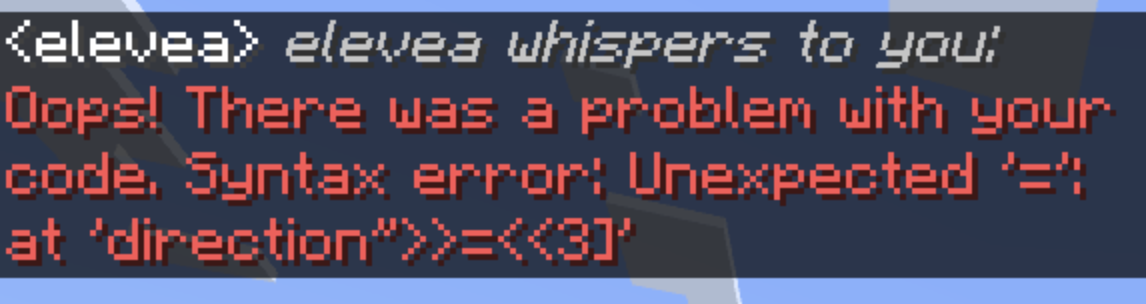
Is this a known limitation or bug in Minecraft Education or MakeCode? Is there a recommended workaround for placing dispensers with a specific orientation?
-
I also tried to add backslash mark to avoid the quotation problem, but it doesnt work
0 -

Hi there,
Thanks for your patience while we took a closer look at this. You were definitely on the right track, and we were able to identify a workaround for setting the orientation of dispensers and droppers in MakeCode.
Instead of using
blockWithDataor"facing_direction", you can use the following:player.execute("setblock ~3 ~ ~ dispenser 2")The value at the end controls the direction the dispenser is facing, so you can adjust it based on the orientation you need.
0
Please sign in to leave a comment.
Comments
2 comments